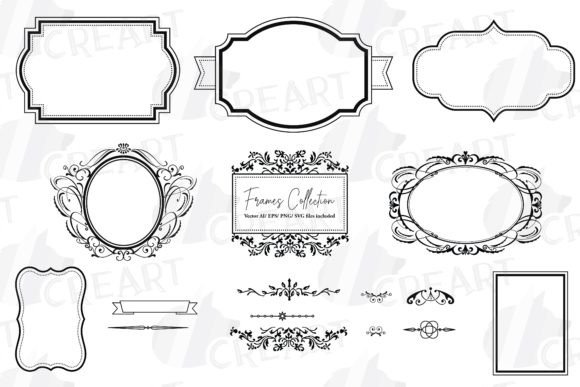
Classic Golden Frames, Borders & Swirls
Elevating your creative projects often comes down to the details. A simple design can transform into a luxurious statement piece with the addition of elegant ornamentation. This is where Classic Golden Frames, Borders, and Swirls become an essential asset for designers, hobbyists, and entrepreneurs alike. Whether you are crafting a wedding invitation, designing a logo for a boutique brand, or adding a touch of sophistication to digital content, these elements provide the perfect finishing touch.
The appeal of golden ornate designs lies in their timeless nature. Gold has long been associated with quality, celebration, and prestige. By integrating these classic motifs into your work, you instantly communicate a sense of value and attention to detail. However, finding high-quality assets that are versatile enough for both print and digital use can be challenging. This comprehensive clip art pack solves that problem by offering a robust collection of ready-to-use frames and customizable components.
What Is Included in the Pack?
Understanding exactly what you receive is crucial for maximizing the value of any digital purchase. This specific collection is designed with flexibility in mind, ensuring that users of all skill levels can achieve professional results. The package includes:
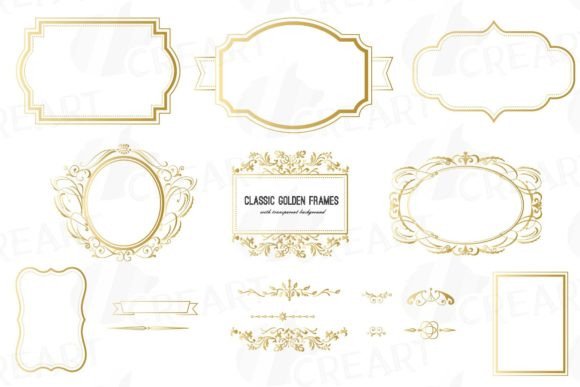
- 8 Different Frames: Pre-designed, intricate golden frames that are ready to drop into your projects.
- 9 Calligraphic Ornate Elements: Individual swirls, corners, and flourishes that allow you to build custom borders.
- 17 High-Resolution PNG Files: These images feature transparent backgrounds, making it incredibly easy to layer them over photos, colored backgrounds, or textures without any white boxes or awkward edges.
- 17 JPG Files: Standard image files suitable for quick previews or platforms that do not support transparency.
- Vector Files (SVG, AI, EPS, DXF): These are the powerhouse formats for serious designers. They allow you to resize the graphics to any dimension—from a small sticker to a large banner—without losing quality or seeing pixelation.
- Silhouette Studio v3 Files: Specifically formatted for users of Silhouette cutting machines, bridging the gap between digital design and physical crafting.
- PDF File: Useful for viewing and printing reference sheets.
This variety ensures compatibility with a wide range of software, from beginner-friendly tools like Canva and Microsoft Word to professional suites like Adobe Illustrator and Photoshop.
Why Choose Classic Golden Designs?
In a digital world saturated with minimalist and flat designs, ornate golden elements stand out. They add depth, texture, and a focal point to any composition. For beginners, using pre-made frames eliminates the steep learning curve associated with drawing complex vector paths from scratch. Instead of spending hours trying to perfect a symmetrical swirl, you can focus on layout, typography, and overall message.
For professionals and small business owners, time is money. Having a library of high-quality, scalable assets means you can produce client-ready mockups and final designs faster. The ability to mix and match the nine calligraphic elements also means you are not limited to just eight designs. You can create unique combinations that suit specific brand identities or event themes, ensuring your work remains original.
Practical Uses for Creators and Businesses
The versatility of this clip art pack extends far beyond simple document decoration. Here are several practical ways to integrate these golden frames and swirls into your workflow:
Event Stationery and Invitations
Weddings, galas, and anniversary parties demand a certain level of elegance. Using the pre-made frames to border your invitation text creates an immediate sense of occasion. The transparent PNGs allow you to place the gold frame over a watercolor background or a photo of the venue, blending traditional elegance with modern personalization.
Product Packaging and Labels
If you sell handmade soaps, candles, or gourmet foods, your packaging is your silent salesman. A golden border around your logo or product name suggests premium quality. Because the vector files (SVG, AI, EPS) are scalable, you can adjust the frame to fit perfectly on a small jar lid or a large box without any loss in resolution.
Digital Marketing and Social Media
Stop the scroll with eye-catching graphics. Use the golden swirls to highlight key quotes or testimonials in your Instagram posts. The high-resolution PNGs ensure that your images look crisp on retina displays. You can also use the frames to create cohesive highlight covers for your social media profiles, giving your brand a polished, curated look.
Print-on-Demand and Apparel
With the included DXF and SVG files, crafters can use cutting machines to create heat-transfer vinyl (HTV) designs for T-shirts and tote bags. The clean lines of the vector files ensure that the cutting machine follows the path accurately, resulting in professional-looking apparel. This opens up opportunities for entrepreneurs to create niche products for holidays, birthdays, or luxury-themed fashion lines.
Web Design and Digital Scrapbooking
For bloggers and web designers, these elements can serve as dividers between sections or as decorative headers. In digital scrapbooking, the ability to layer transparent PNGs allows for complex, multi-dimensional layouts that mimic real-life embellishments without the physical bulk.
Important Considerations for Best Results
While these assets are user-friendly, keeping a few technical tips in mind will help you get the most out of them. First, always check the color mode of your project. If you are designing for print, ensure your software is set to CMYK, and if the gold appears too yellow or dull, you may need to adjust the hue slightly to match metallic ink capabilities. For digital use, RGB is standard and will display the vibrant gold tones accurately on screens.
Secondly, respect the layers. When using PNGs with transparent backgrounds, ensure that the frame is placed above the background layer but below any text you want to appear "inside" the frame. This creates a realistic depth effect. If you are using the vector files to create custom shapes, take advantage of the node editing tools in programs like Illustrator or Inkscape to tweak the swirls to fit your specific space constraints.
Finally, consider the balance of your design. Golden ornate elements are bold. They work best when paired with clean, readable fonts and ample white space. Overcrowding a design with too many swirls can make it look cluttered rather than elegant. Use the frames to guide the viewer’s eye to the most important information, such as a date, a name, or a call to action.
By incorporating Classic Golden Frames, Borders, and Swirls into your creative toolkit, you gain access to a resource that bridges the gap between amateur experimentation and professional polish. Whether you are printing physical goods or designing digital experiences, these elements provide the structure and flair needed to make your work memorable.